This is default featured slide 1 title

Go to Blogger edit html and find these sentences.Now replace these sentences with your own descriptions..

This is default featured slide 2 title

Go to Blogger edit html and find these sentences.Now replace these sentences with your own descriptions..

This is default featured slide 3 title

Go to Blogger edit html and find these sentences.Now replace these sentences with your own descriptions..

This is default featured slide 4 title

Go to Blogger edit html and find these sentences.Now replace these sentences with your own descriptions..

This is default featured slide 5 title

Go to Blogger edit html and find these sentences.Now replace these sentences with your own descriptions..

Showing posts with label Samsung. Show all posts

Friday, June 17, 2011

Samsung Galaxy Tab 10.1 Review: The Sleekest Honeycomb Tablet

I remember standing in the audience of Samsung's CTIA press conference as it announced, for the first time ever, pricing and availability of its unreleased Galaxy Tab 10.1 and 8.9 before shipping. The smartphone (and early tablet) industries have gone this long without having to really compete based on price, mostly because in North America the carriers subsidize much of the cost. If every device costs $199 under contract, why get carried away with details like how much it actually costs?

The Galaxy Tab however was playing in a different space. While Apple ultimately caved to the pressures of carrier subsidies with the iPhone, the iPad remains completely unsubsidized and its followers buy it by the millions. The magical price point is $499 and it was at Samsung's CTIA press conference that it announced it would be matching Apple's $499 price point, and even dropping slightly below it for the 8.9-inch version.
At the time it seemed like a bold move, enough to give Honeycomb the fighting chance it needed. The Galaxy Tab would be thinner and lighter than the iPad 2 but competitively priced as well. This wouldn't be another Xoom.


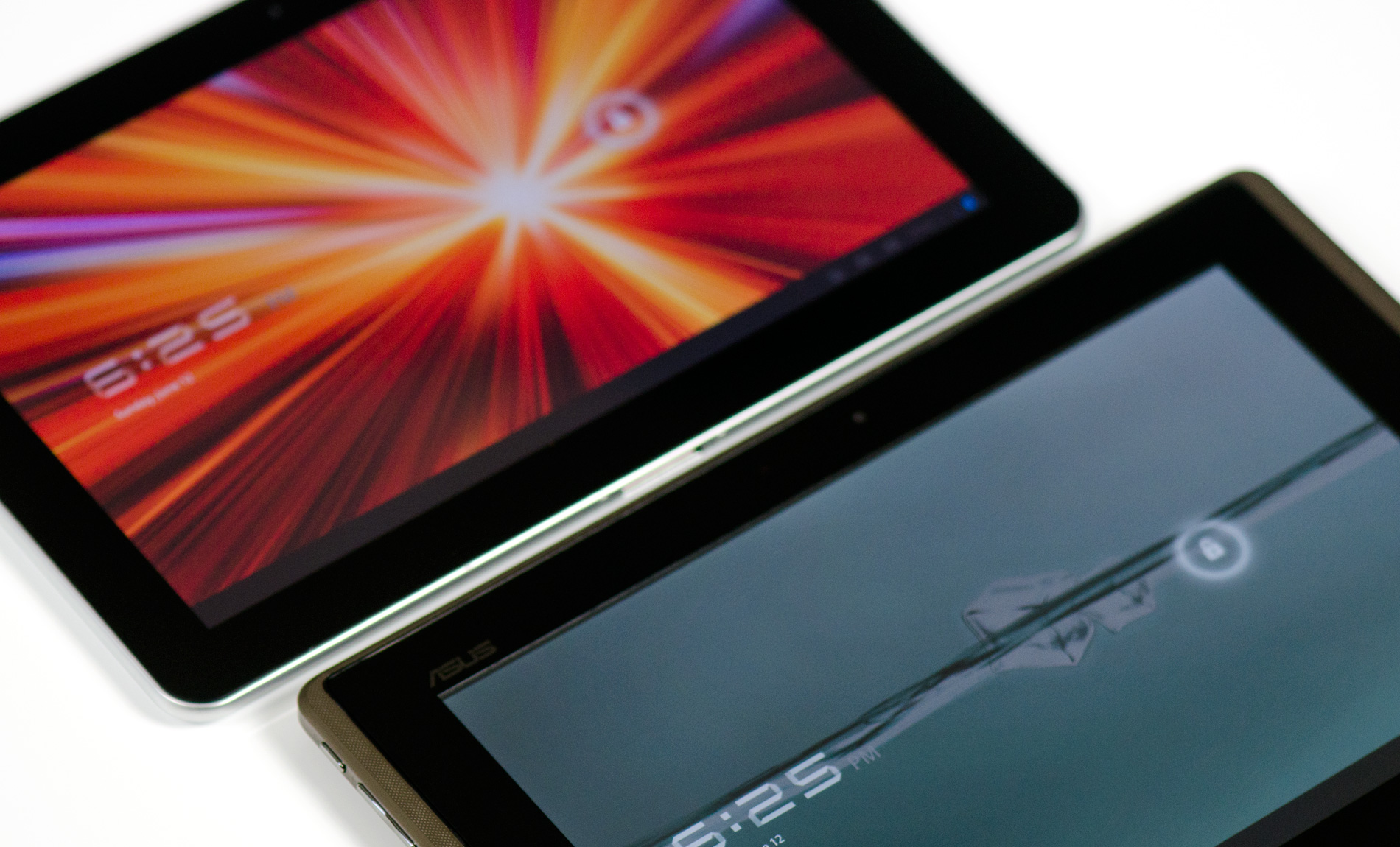
Samsung Galaxy Tab 10.1 (top) vs. ASUS Eee Pad Transformer (bottom)

Then ASUS showed up. At $399, the Eee Pad Transformer not only offered a different usage model to the iPad and Galaxy Tab, it brought a lower price tag as well. Availability has been slim thanks to component shortages, but with the Eee Pad selling for $399 the Galaxy Tab at $499 all of the sudden seems overpriced.

2011 Tablet Comparison
  Apple iPad 2 ASUS Eee Pad Transformer Motorola Xoom WiFi Samsung Galaxy Tab 10.1
SoC Apple A5 (Dual ARM Cortex A9 @ 1GHz) NVIDIA Tegra 2 (Dual ARM Cortex A9 @ 1GHz) NVIDIA Tegra 2 (Dual ARM Cortex A9 @ 1GHz) NVIDIA Tegra 2 (Dual ARM Cortex A9 @ 1GHz)
GPU PowerVR SGX 543MP2 NVIDIA GeForce NVIDIA GeForce NVIDIA GeForce
RAM 512MB 1GB 1GB 1GB
Display 1024 x 768 IPS 1280 x 800 IPS 1280 x 800 1280 x 800 PLS
NAND 16GB 16GB 32GB 16GB
Dimensions 241.2mm x 185.7mm x 8.8mm 271mm x 175mm x 12.95mm 249.1mm x 167.8mm x 12.9mm 256.6 x 172.9 x 8.6mm
Weight 601g 695g 730g 565g
Price $499 $399 $599 $499
Based on specs alone you'd be right. Samsung's Galaxy Tab 10.1 has the same NVIDIA Tegra 2 tablet SoC inside,

1GB of LPDDR2 and 16GB of NAND on-board. You get a 10.1-inch 1280 x 800 PLS display and 802.11n WiFi support. It's worth pointing out that we're now well into the month of June and NVIDIA continues to be the only SoC vendor shipping in Honeycomb tablets. Samsung originally had plans to ship its own Exynos SoC in the Galaxy Tab but Tegra 2 remains the port of choice for all Honeycomb vendors at this point. Whether or not NVIDIA can win twice in a row with Ice Cream Sandwich later this year remains to be seen.


Samsung Galaxy Tab 10.1 (left) vs. ASUS Eee Pad Transformer (Right)

Where Samsung gives you something more for your money is in build quality and form factor. While Eee Pad Transformer feels surprisingly good for a cost reduced tablet, it doesn't feel nearly as slim or portable as the Galaxy Tab 10.1. It's no wonder Samsung went back to the drawing board on this one, the result is something that in many ways feels better than the iPad 2.


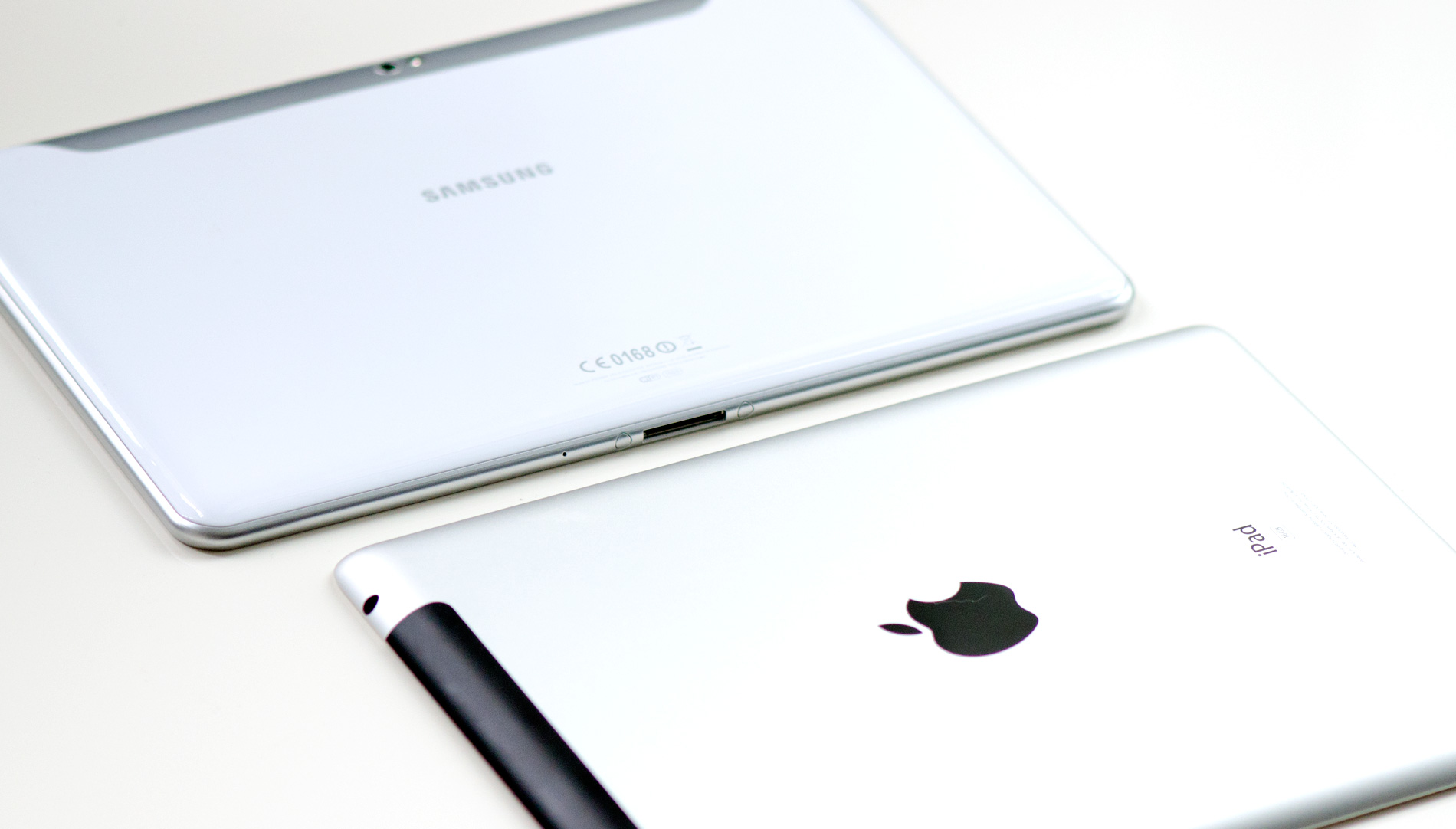
Apple still gets the nod in terms of quality of materials. The aluminum back of the iPad 2 is unbeatable. The Galaxy Tab 10.1 however feels lighter, a bit more rugged (I'm less concerned about scratching plastic than I am marring aluminum) and a little more comfortable to hold as a result. Against the Eee Pad there's no competition. I can live with the Eee Pad, but I much prefer the feel of the Galaxy Tab 10.1. The new Tab just feels like a device from this year - a complement that, until now, I had only given to Apple.


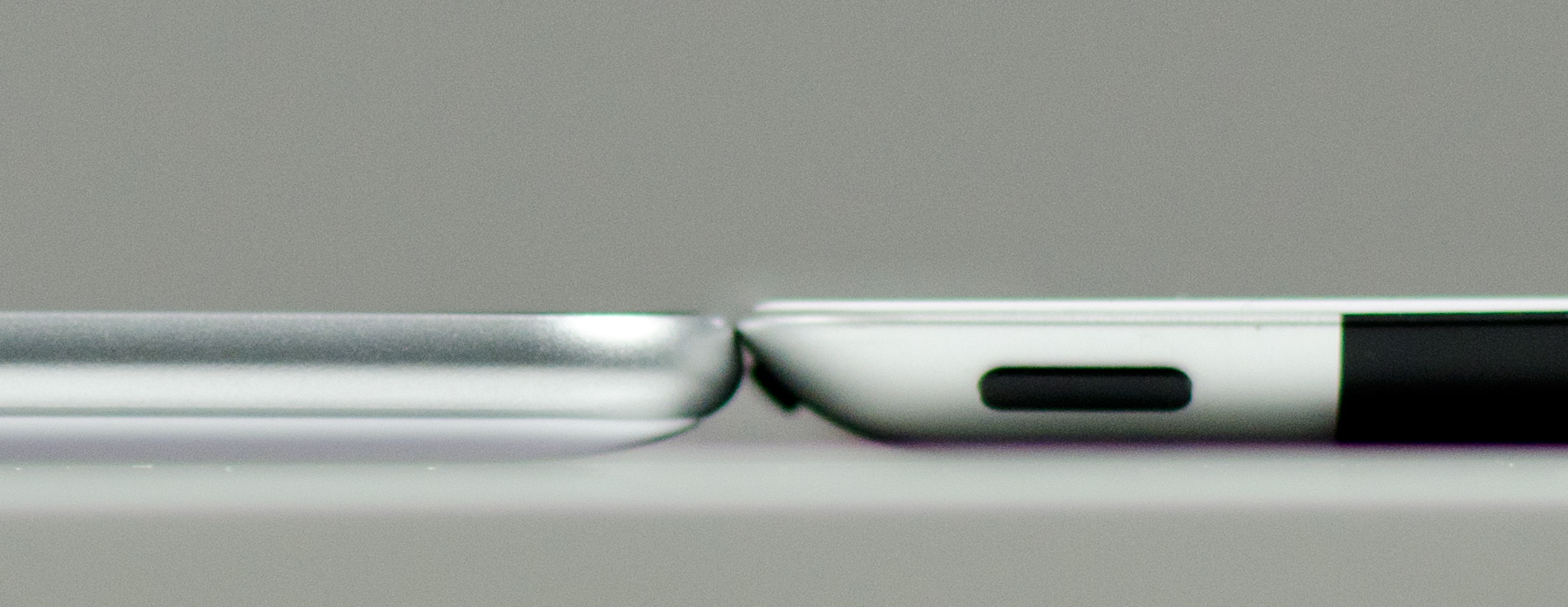
The Galaxy Tab 10.1 measures just 8.6mm thick, 0.2mm thinner than the iPad 2. To be honest you really can't tell the difference, both devices feel thin. Ever after holding them back to back it's near impossible to tell that Samsung has built a thinner device. The most tangible difference in feel is the weight, not just in overall mass but in terms of weight distribution. The Galaxy Tab seems to carry the weight a bit better than the iPad, a bit more evenly.


Samsung Galaxy Tab 10.1 (left) vs. Apple iPad 2 (right)

Now is as good a time as any to point out that although Samsung calls this the Galaxy Tab 10.1, it's really the new Galaxy Tab 10.1. Originally Samsung announced a much thicker version at Mobile World Congress, a month prior to the CTIA announcement. With the much thinner iPad 2 hitting the market after the original 10.1 announcement, Samsung scrapped plans for the original and unveiled the thinner 8.6mm version as the new Galaxy Tab. The original Galaxy Tab 10.1 is now known as the Galaxy Tab 10.1v.

Sunday, May 8, 2011

Samsung Notebook Series 9 (NP900X3A-A01AU)

The Samsung Series 9 notebook is one of the thinnest and lightest 13.3in notebooks on the Australian market to feature a Second Generation Intel Core i5 CPU. It's beautifully designed and crafted and it feels very comfortable to use, whether you're typing at a desk or on your lap. With a price tag of $2499, it's not cheap, but it's definitely worth it if you want superb mobility and build quality as well as very decent performance for office and multimedia tasks.

Build quality

The Series 9 is constructed out of Duralium (a type of light and strong aluminium alloy that's also used to construct aircraft frames). It weighs around 1.3kg and it feels solidly built. The screen's lid has a little bit of flexibility, but only minimal puddling can be seen on the screen when you stress it. While the Series 9 has a sealed design (which makes it very hard for an end user to service it), its base consists of two parts that are held together by screws. This means that movement isn't completely absent and sometimes when you pick up the notebook it will make a little clicking noise as the two parts come together slightly — this was particularly noticeable on the left side of the unit. That nitpick aside, it's still a very strong chassis design.

The balance of the notebook is excellent. You can lift the lid using one finger while the notebook is resting on a hard, flat surface. The hinges are very smooth and they hold the lid in place even when the notebook is subjected to a lot of up and down motion (while commuting, for example). We did notice a very small amount a play in the hinges though — they felt a little loose when moving the screen upward — but it wasn't problematic.
A cooling fan is present in the chassis and its vent is underneath the base. It's not an optimal location for vent holes; if you use the Series 9 on your lap or on any other surface that blocks these vents for a long period of time, the base has the potential to get uncomfortably warm — not as uncomfortable as the Toshiba Portege R700 though, which runs a full-blown Core i5 CPU rather than a low voltage model. For the most part though, the Series 9 runs very cool. If all you'll be doing is typing a document or browsing a Web page while resting it on your lap, then you probably won't be bothered by much warmth from the chassis.

Screen quality

The 1366x768-resolution screen is one of the better ones we've seen on a laptop to date. It has a matte finish, so it's not susceptible to reflections, and its contrast and brightness are excellent, making it perfect for viewing photographs. It's so bright, you can relatively easily use the Series 9 to type out a document or read a Web page when sitting outside on a sunny day, but by the same token it can be uncomfortable to use in a dark environment.

To keep the screen brightness comfortable, an ambient light sensor sits just above the keyboard and it can automatically adjust the brightness depending on the lighting conditions in your environment. However, it didn't always work perfectly: we sometimes had to disable and re-enable the Adaptive Brightness setting in the Samsung Control Centre software in order for it to detect the proper brightness level. It was also very sensitive: switching on a corner light in an otherwise dark room made the screen a lot brighter than it should have.

Keyboard and touchpad

We love the Series 9's keyboard, which has sturdy, full-sized keys that give almost perfect responsiveness. There is a white backlight under the keyboard, and it has eight levels of adjustment. The first three levels are very subtle and only just illuminate the keys; it's nice to have so much control over this feature.

The touchpad that resides on the Series 9's 90mm deep palmrest is one of the best we have ever used. It is large (98x68mm) and highly responsive to basic movements and multi-finger gestures, and its texture is soft and smooth. In our tests, we could easily scroll long Web pages using a two-finger gesture — it wasn't frustrating like it can be on laptops with smaller touchpads. The page didn't move too fast or too slow and we didn't ever have trouble with the gesture not being recognised. Likewise, using a three-finger gesture to flick back and forth between Web pages was a simple task.

The buttons for left- and right-click operations are located underneath the touchpad itself, which is what allows the touchpad to be so big and comfortable. It's similar to the touchpad found on some HP notebooks (such as the AMD Fusion-based Pavilion dm1), but much easier to use — you can easily left-click and drag using only one hand. The only fault that we found with the touchpad was that sometimes we had to press the right button twice in order for it to work, and this was usually because we pressed slightly too high on the initial click.

Images:


Thursday, January 20, 2011

Samsung Nexus s Latest Hardware Meets Amazing Software


Gingerbread pre-installed

Nexus S is the first phone to run Gingerbread, the fastest version of Android yet.
Gingerbread builds on some of the most popular Android features like multi-tasking and Wi-Fi hotspot and adds a refreshed user interface, an improved keyboard, near field communication (NFC) support, and more.

Refined look and feel

There’s a slick black notification bar that’s easier to read and an improved on-screen keyboard with multi-touch support that makes typing faster and more accurate.


Watch a video
 

One-touch word selection and improved copy-paste

With Gingerbread, copying and pasting text is easier than ever. Use the new text selection tool to copy and paste when entering text or viewing a webpage.


Watch a video

Internet calling (VoIP/ SIP support)

Gingerbread allows Nexus S to place Internet calls with a SIP account. This allows for enhanced VoIP dialing to other SIP accounts and even phone numbers.

Watch a video 

Portable Wi-Fi hotspot

Nexus S can function as a Wi-Fi hotspot for up to six portable devices such as laptops or tablets. Once connected, these devices will have access to the Internet.*

Watch a video
 
*Additional fees may apply based on carrier policy.

Need for Speed Shift from EA available on Android Market winter 2010

Fast just got faster

A 1 GHz Hummingbird processor paired with 16GB of internal memory makes Nexus S one of the fastest phones on the market.
Menus open faster, tabs are more responsive, and web pages load quicker with virtually no lag time. Switch between apps effortlessly with true multitasking on Android.
Nexus S has a dedicated Graphics Processing Unit (GPU). Playing mobile games, browsing the web, and watching videos are fast, fluid, and smooth. It's like having a pocket-sized multimedia and game console.


Watch a video

Brilliant 4” Contour Display

Nexus S is manufactured by Samsung, and it is the first smartphone to launch with a Contour Display. The curved glass screen fits comfortably in the palm of your hand and along the side of your face.
A brighter screen with higher contrast means colors are incredibly vibrant, text is crisp at any size, and luminance is up to 1.5x higher than conventional LCD displays.

Outdoor viewing

Take Nexus S outside, there's 75% less glare than on other smartphone displays. Your videos, pictures and games look their best and the sun won't wash them out.

Lighter and thinner profile

The Contour Display uses a thin-profile glass panel, making Nexus S uniquely slim and trim. It's subtle but you'll notice.

Near Field Communication (NFC)

Nexus S can read information from "smart" tags, or everyday objects that have NFC chips in them. These can be anything from stickers and movie posters to t-shirts.
Watch a video

Rear and front-facing cameras

The rear-facing 5 megapixel camera is capable of taking stunning pictures and videos that you can share with friends and family. The front-facing camera can take VGA quality images and video.

Unlocked by default

Out of the box, Nexus S is unlocked, so it will work with any GSM carrier.

Latest Google Mobile apps

Nexus S comes pre-installed with the best of Google apps, including Google Search, Google Maps with Navigation (Beta), Mobile Instant, Voice Actions, Gmail, Google Earth and more. With Nexus S, be the first to receive upgrades, features and new apps as they become available.

Android Market

Nexus S provides access to over 100,000 apps, games, and widgets on Android Market.
  • Market
  • YouTube
  • Navigation
  • Voice Search
  • Voice
  • Maps

Never get lost again

Explore the world in 3D from the palm of your hand using Google Maps 5.0 with Navigation (Beta), Places, and Latitude.
Zoom, tilt, and rotate the map with two fingers to explore cities in 3D. Orient yourself with compass mode, which automatically rotates the map to the direction you’re facing. Keep viewing the maps you use the most, even if you lose your connection.
Find local spots like restaurants and ATMs using Places. Then, use Navigation for free turn-by-turn GPS voice guidance with offline rerouting.
Watch a video about 3D Maps
Watch a video about Navigation

Speak, don’t poke

Nexus S listens to you. With Voice Actions, press and hold the Search button from anywhere and speak almost anything.
  • send text to mom
  • listen to muse
  • navigate to golden gate bridge
  • call julie at home
  • set alarm for one hour from now
  • map of restaurants
  • note to self i parked on floor 5
  • directions to 513 west 54th st
  • go to reddit
Watch a video

Big Buck Bunny ©2011 Blender Foundation

Entertainment on the go

More people are watching videos on the go, and using the latest YouTube app for Android means having millions of videos right in your pocket.
YouTube for Android has been redesigned to include a personalized home screen feed, in-page playback, and a rotate-for-fullscreen gesture. Nexus S' blazing speed makes it easy to browse, play, and upload photos.

Email pushed to your phone

The Gmail app for Android has your favorite Gmail features–from labels to stars to archiving–at the touch of a finger.
With push email, new messages appear in your inbox as soon as they arrive. You'll always be up to the moment.
Learn more about Google Mobile apps for Android

Monday, January 3, 2011

Samsung Amazing Disruptive Product of the Year

PC-like web Browsing
Small, portable and lightweight with a large 7" screen, the GALAXY Tab allows you to take videos and photos using the 3 Megapixel camera, surf the net, play Flash videos and games and make voice calls and video calls to family and friends all from the one amazing devices


 PC-like web Browsing

Supporting Adobe Flash Player 10.1, GALAXY Tab brings swift and seamless viewing of web. From flash movies to full flash websites, you’ll see it all. Surf the web at your leisure and enjoy the internet as it’s meant to be experienced-especially from the GALAXY Tab’s huge 7" display.

Samsung Readers Hub, one stop for books, magazines, and newspapers

Samsung Readers Hub, one stop for books, magazines, and newspapers

Samsung Readers Hub is your one stop for books, magazines and newspapers from Australia and around the world. Whether you’re travelling on vacation or just commuting to work, carry every single book, magazine and newspaper you want to read. The 7” screen and familiar paperback size of the GALAXY tab provides you with a traditional reading experience, making it a joy to read from.

One time download of Newspapers Direct and Zinio application from Samsung Apps required.
Data download charges may apply. Costs may apply for paid Samsung Readers Hub material.

Communicate face-to-face with the entire team

 Communicate face-to-face with the entire team

The Samsung GALAXY Tab's calling function allows you to make and receive voice and video calls through the speakerphone or your Bluetooth headset. The 7"" screen is also perfect for video conference calls that let you meet with your entire team with the press of a button.

Smaller & Lighter

 Smaller & Lighter

GALAXY Tab boasts an enviably small form factor-it's the size of a paperback book but possesses the computing power of a laptop. A slim, lightweight design that's so light and small you'll want to bring it everywhere. The compact tablet design can be operated with a single hand, ideal when you're on the go.

Samsung Social Hub integrates your E-mail, IM, and SNS

 Samsung Social Hub integrates your E-mail, IM, and SNS


With Samsung Social Hub, the GALAXY Tab integrates your contacts from your email, instant messaging and social networking sites (including Facebook, Twitter and MySpace) directly into the phonebook contacts. This single contacts list brings together all of your friends details so you can easily share updates and check all your friends status as well as voice call, video call or SMS.

Premium turn-by-turn navigation by NAVIGON

 Premium turn-by-turn navigation by NAVIGON
Be it on foot or driving– receive turn by turn voice guidance to you navigate you to your destination faster and safer than ever before. Powered by NAVIGON, the GALAXY Tab's premium navigation app comes with Australian and New Zealand maps preloaded as well as other functionality you would expect from a dedicated GPS unit including 2D and 3D map view, Reality View Pro, NAVIGON MyRoutes, Car and Pedestrian mode, Intelligent address search and Navigate to contacts.

Data download charges may apply for initial application update, approximately 9MB in size.
Car mounting kits for the GALAXY Tab are sold separately and should be used for in-car navigation.


Thinkfree

Thinkfree

Create and edit Office documents in Word, PowerPoint and Excel that can be viewed and shared with others. Download and edit documents from the ThinkFree online server and also view PDF's, all in their original formats.

Integrated Calendar

Integrated Calendar 

Maximise your work time, maintain personal commitments, and prioritise your tasks to get the most out of your day. The Integrated Calendar synchronises your GALAXY Tab calendar with your calendars in Google, Facebook, and Microsoft Exchange (MS Outlook*) to bring together all of your meetings, events and tasks and lets you view your schedule by day, week, month or list.
*ActiveSync support is server dependent.

Saturday, January 1, 2011

Samsung AMOLEDs At CES-Transparent and Flexible


Is the future e-paper? LCD? Plasma? AMOLED? It's probably a mixture of all of them, plus a few display technologies that don't even have a name yet. But in the mobile realm, display technology is of particular importance. With the explosion of smartphone growth, people are paying more attention to the size, screen resolution and quality of their mobile displays. Samsung Mobile Display is intent on making sure the future is filled with amazing mobile screens, and they're planning to showcase a slew of new, crazy, wild technologies at CES 2011 next week.

Among the stars at the show will be a 4.5" WVGA flexible AMOLED, which offers the world's highest flexible display resolution. SMD is presenting a prototype of the most advanced flexible AMOLED display, which is only 2mm thick, and uses a WVGA 800 x 480 resolution. Wilder still, it can be rolled down to a one centimeter radius. At WVGA, this new concept prototype offers a display resolution four times that of the previous most flexible AMOLED prototype in the industry, thanks to the use of a new plastic substrate that can withstand the 450-500 degree temperatures required in the manufacturing process.


Then there's a 19" qFHD transparent AMOLED screen. This definitely isn't for a smartphone, but a transparent screen will certainly get people talking. It's being called the world's first large-screen transparent AMOLED production prototype, designed for use in applications from PC monitors to TVs. Whether the prototype AMOLED display is turned off or on, it maintains up to a 30% transparency. The average amount of transparency elsewhere has been below 10 percent.

Samsung isn't coming clean with actual production dates for these, but simply showcasing them gives us hope that they aren't too far out from mass production. Maybe a good New Year's resolution, SMD?

Samsung Mobile Display Unveils Next-generation AMOLED Displays at CES 2011: Digital Experience!
2011 International CES

LAS VEGAS--(BUSINESS WIRE)--Samsung Mobile Display (SMD) will be demonstrating leading-edge, next generation AMOLED displays at Pepcom’s The Digital Experience! press event during the Consumer Electronics Show, at the Caesars Palace Hotel on Wednesday, January 5th from 7 to 10pm.

1. A 4.5-inch WVGA Flexible AMOLED offering world’s highest flexible display resolution

SMD is presenting a prototype of the most advanced flexible AMOLED display. Only 2mm thick, the 4.5 inch flexible AMOLED runs at a WVGA 800 x 480 resolution and can be rolled down to a one centimeter radius.

At WVGA, this new concept prototype offers a display resolution four times that of the previous most flexible AMOLED prototype in the industry, thanks to the use of a new plastic substrate that can withstand the 450-500 degree temperatures required in the manufacturing process.

Typically, flexible displays use plastic substrates instead of glass substrates because this helps the display become lighter and thinner. Furthermore, the new plastic substrates are not prone to breakage during manufacturing. Previously, plastic materials melted at temperatures over 400 degrees during the manufacturing process, making commercialization difficult.

Development of the 4.5 inch Flexible AMOLED prototype, designed for smart phone and tablet PC displays, is a major step on the road to mass production.

2. A 19-inch qFHD Transparent AMOLED for TVs and monitors: World's first large-screen transparent AMOLED production prototype

SMD is showing the world’s first large transparent AMOLED Display prototype, designed for use in applications from PC monitors to TVs.

Whether the prototype AMOLED display is turned off or on, it maintains up to a 30% transparency. The average amount of transparency elsewhere has been below 10 percent.

SMD’s transparent AMOLED prototype provides the highest resolution on a transparent large screen TV (over 19 inches) or monitor display.

Uses may include searching the Internet while watching TV, or watching TV on windows, including car windows for backseat passengers.

SMD will also be exhibiting a 14-inch qFHD transparent AMOLED for notebook PCs.

Related Posts Plugin for WordPress, Blogger...
Powered by Blogger.