This is default featured slide 1 title

Go to Blogger edit html and find these sentences.Now replace these sentences with your own descriptions..

This is default featured slide 2 title

Go to Blogger edit html and find these sentences.Now replace these sentences with your own descriptions..

This is default featured slide 3 title

Go to Blogger edit html and find these sentences.Now replace these sentences with your own descriptions..

This is default featured slide 4 title

Go to Blogger edit html and find these sentences.Now replace these sentences with your own descriptions..

This is default featured slide 5 title

Go to Blogger edit html and find these sentences.Now replace these sentences with your own descriptions..

Showing posts with label Power PC. Show all posts

Friday, September 23, 2011

Zotac Z68ITX-A-E Wifi Review - Mini-ITX meets Z68

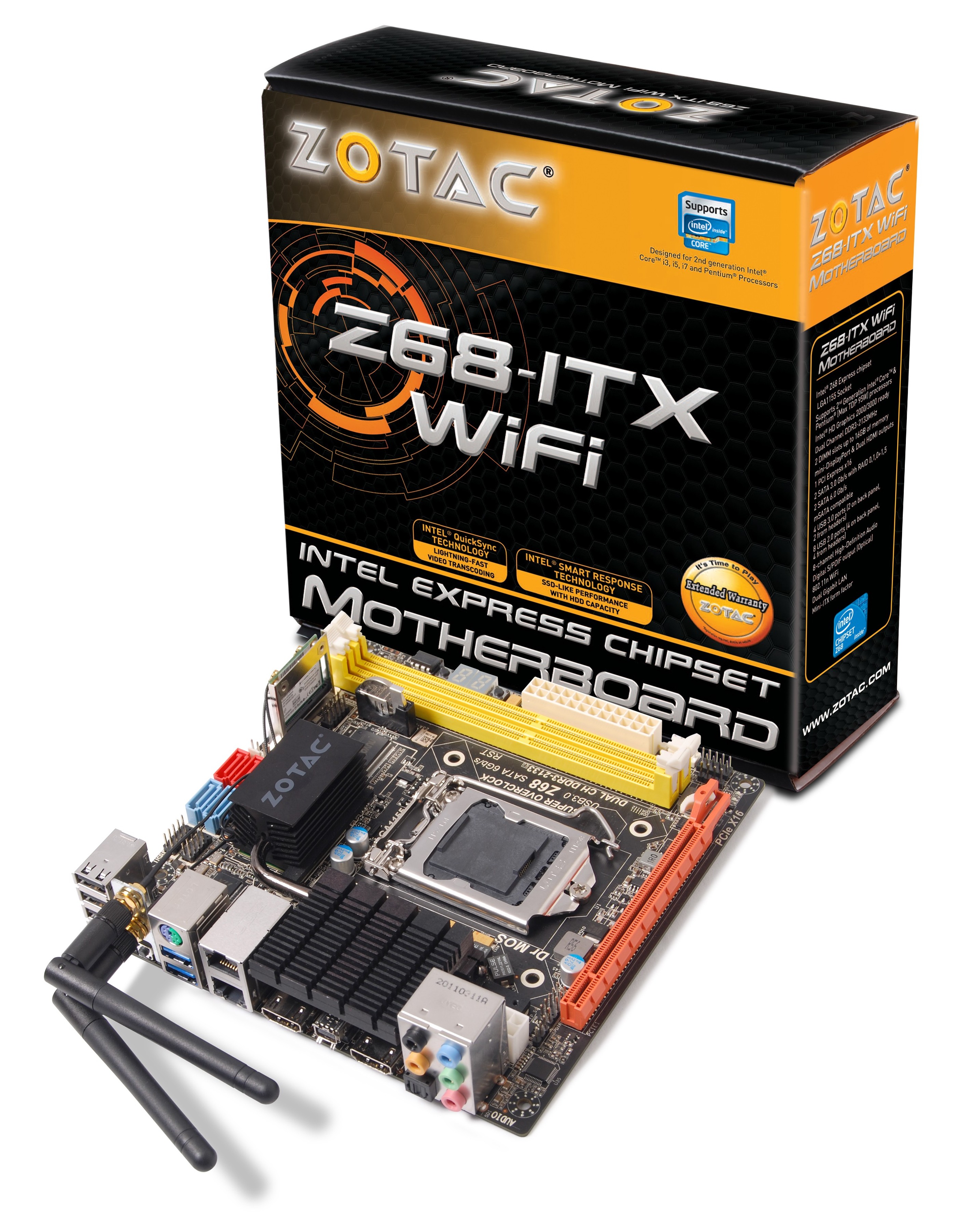
With every chipset, there's a call to arms in providing the package that everyone needs. Unfortunately there's never one motherboard which can cater for every possibility, but there are some that come quite close. Our review today is on the Zotac Z68ITX-A-E Wifi - a mini-ITX take on the Z68 chipset, which promises to be a winner right from the start, with dual gigabit Ethernet, USB 3.0, onboard wifi, onboard power/reset buttons, a debug LED, a lot of extras with your motherboard, and all the extras that Z68 offers. For $170, we're looking at a good contender for an award here, as long as the performance and additions compare well to its rivals.

 
Overview

The most noticeable thing about using the Zotac board for this review is the out-of-spec features used by Zotac. With regards to the turbo of the CPU, the CPU should scale down the multiplier bins the more cores being used - however, the Zotac board likes to apply a 4x multiplier increase, even in full CPU usage. This gives it a distinct advantage in all our stock benchmark suite, and an unfair advantage against every other board in the market. It gives the consumer, however, extra performance without having to do anything. This may set an unhealthy trend, where other manufacturers will similarly produce products out-of-spec in order to jump ahead in performance.

Overall, for $170, Zotac have provided a board full of features that provide a great motherboard for various consumer levels. The addition of dual gigabit Ethernet, onboard wifi, dual HDMI, and that out-of-spec CPU speed are nice additions to such a small product. This situation benefits a non-K Sandy Bridge CPU (which unfortunately negates one of the Z68 features, overclocking, which as we find out isn't that great on the Zotac) where the iGPU is required as well as the PCIe x16 slot. There's not too many SATA ports (two SATA 6 Gbps, two SATA 3 Gbps), which perhaps is ideal for the non-enthusiast consumer (SSD, HDD, DVD/BluRay drive). Also, the lack of overclocking may be a sticking issue for some. I'm unsure if I should label it a gamers' board, a 24/7 machine with various enthusiast applications that require performance, or a multi-monitor setup that needs Sandy Bridge and Z68 and perhaps a GPU for GPU programming. Nevertheless, I've found the board an impressive product at a great price, despite the old fashioned BIOS and lack of software provided.
 
Visual Inspection


With Zotac's aim of piling as much as it can onto such a small PCB, it is obvious to see that the board is fairly cramped, in a livery with no defined color (yellow, orange, red, blue, black). As a result, the 8-pin 12V CPU power connector is on the far end of the board behind the audio headers of the I/O panel. The CPU socket is also quite small in comparison to full size P67/Z68 boards we've seen this year, negating large CPU coolers but still providing enough space for stock coolers and all-in-one CPU coolers such as the Corsair H50 and H100.

There are two fan headers on board - one by the SATA ports and the other beside the 24-pin ATX power connector. Beside this power connector are the power/reset buttons and a debug LED - it's great to have this on such a small board. The wifi module is in a mini-PCIe (with mSATA compatibility) between the memory slots and the SATA ports - with cables from the wifi card to the I/O panel. A full size mSATA holder is included in the bundle, if the user decides not to use the wifi and takes advantage of the Z68 Smart Caching Technology via this port.


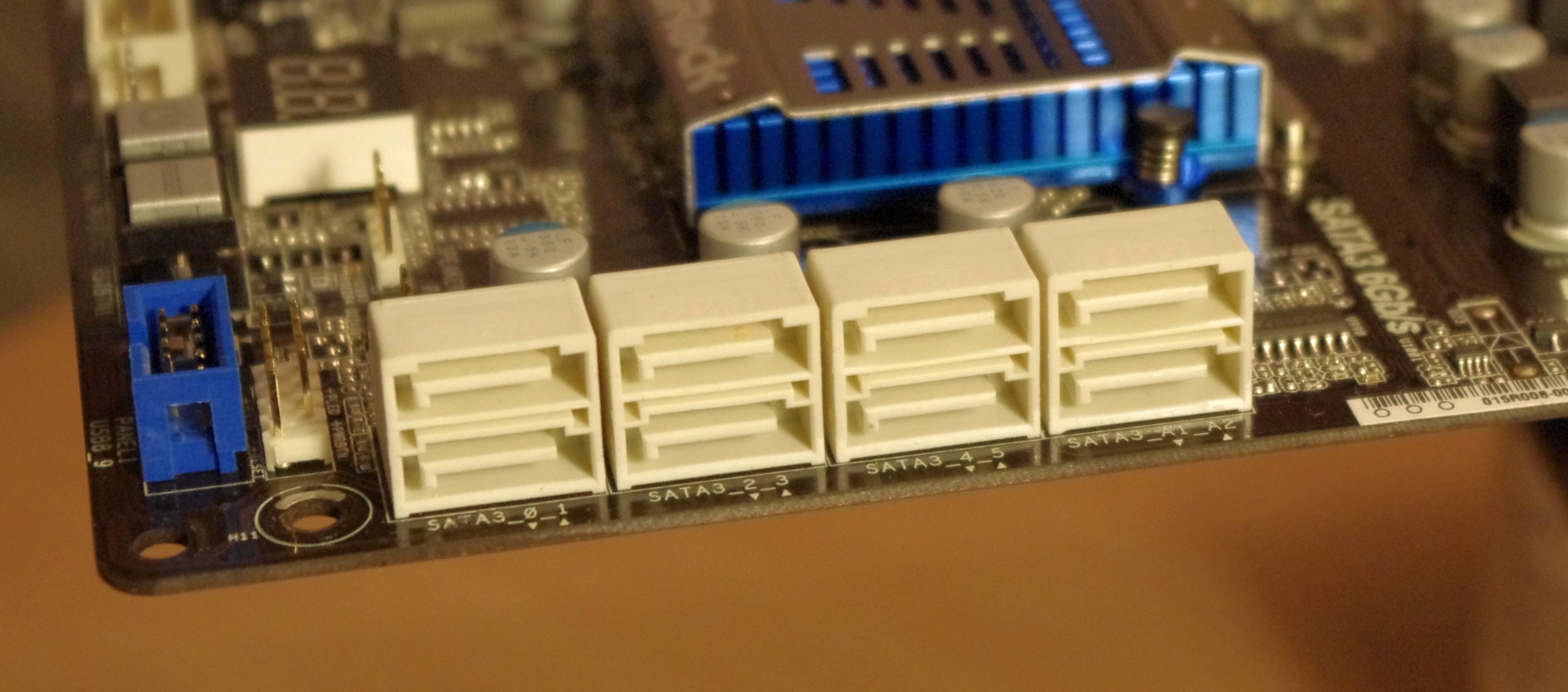
On board are four SATA ports - two SATA 6 Gbps and two SATA 3 Gbps, all from the PCH. Technically the PCH should be able to support two more, but given the size of the board and all the other extras on it, it's understandable that these are not included. Beside the SATA ports are two USB 2.0 headers, and beside them, behind the wifi antenna, is a USB 3.0 header.


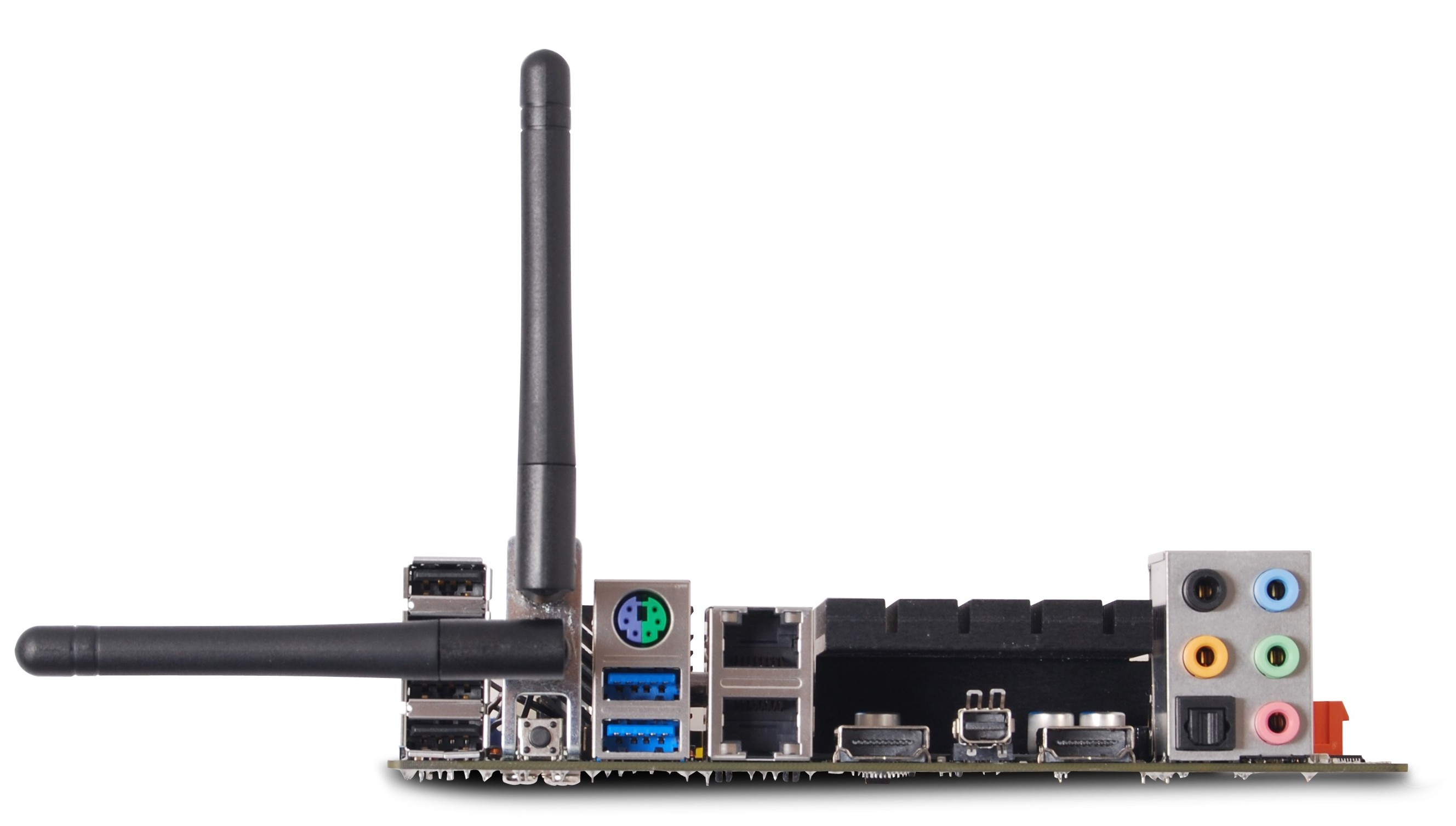
The back panel of the board is also similarly cramped, with a combination of wifi antenna, dual gigabit Ethernet, two USB 3.0, four USB 2.0, a clear CMOS button, a PS/2 Connector, dual HDMI and mini-DisplayPort, optical SPDIF output, and the standard audio jacks. The combination of having the heatsink there results in some space lost - perhaps if it wasn't there by design, the HDMI and mini-DP could be stacked and other features could be added.
Saturday, July 2, 2011

Desktop Llano Overclocking ASRock A75 Extreme6 Review

Our initial tests with the ASRock A75 Extreme6 were based on a pre-release model, and shown in our preview.  At that point, the board design was not finalized and the BIOS was still quite raw, but the performance was essentially complete.  However, now in my grasp is the full release version of the Extreme6.  Alongside this standard motherboard review, and testing to see whether it's worth the $150 asking price, we're also going to take a good look at the overclocking features of the Desktop Llano chipset.

I've essentially run our motherboard test suite on two versions of this board now, and having recently played with Cougar Point and AMD Fusion (review to come), it slots nicely in the middle in most aspects - especially CPU power.  We're not seeing anything special here with Desktop Llano - as Anand pointed out, in the region of Phenom II X4 performance.  For the integrated GPU, it's a different matter, with up to 2x the performance of the highest version of Intel's integrated graphic solutions of the Sandy Bridge second generation Core series.  Both of these will come in the form of results I will look at later.
 
Overview

The ASRock A75 Extreme6 is aimed at the high end Desktop Llano workspace, and, from what ASRock are telling me, will ship in at $150.  Unfortunately, I haven't other A75 boards to compare it to yet, but I get the same steady feeling I've got from ASRock boards of late - it's just something that works.  There's one minor glitch for now that I've found, to do with memory compatibility, but what we're dealing with here on the board is a good number of features, and the only real downside is the Llano chip itself.
If we look at the prices of the 890 chipset, most motherboards are in the $100-$145 range, so in terms of CPU performance, we're paying a little extra.  With the integrated APU at hand, however, you could see where the extra comes from - a different power integration arrangement, and the need for various video output connectors.  Personally, I see Desktop Llano more of a niche area, so it will be interesting to see how aggressive the motherboard manufacturers are with pricing.
 
Visual Inspection

Desktop Llano features the same retention bracket spacing as AM2 and AM3, which, in all honesty, is quite big compared to Intel's chipsets.  As a result, we see a bunched up power delivery to the west of the socket itself, covered in a large heatsink of ASRock's design (this is a main difference to the preview board I tested earlier).  The chokes on this design are still of the old design - if you can recall, during my tour with ASRock at Computex, I noticed they were using a different choke design on their high end boards to improve power delivery, heat generation and efficiency (similar to MSI's SFC).  It seems that the new design still hasn't filtered down into their non-gaming products; despite the fact that I was told that the two choke designs cost the same.

The socket area itself has five fan headers, of which I highly approve and would like to see on every other motherboard on the market - I'm using a Corsair H50, which in dual fan mode requires three (two for fans, one for the pump), so having another couple at hand for case fans is always a plus.  Two of the fan headers are labelled for the CPU (one four pin, one three pin), the two under the power delivery are chassis headers (both three pin), and the one above the power delivery is a PWR fan (again, three pin).  Elsewhere on the board is one more fan header, labelled as chassis (another three pin).


Beyond the 24-pin ATX connector is a USB 3.0 header, but unfortunately no USB 3.0 bracket comes with this ASRock board like their Sandy Bridge Extreme series.  The eight (yes, eight) SATA 6 Gb/s ports come in a couple of flavors - six from the Fusion Controller Hub (FCH), and two more from an ASMedia controller.  We also see the Power/Reset/Debug LED combo, which I approve of.
 

The FCH heatsink is ASRock's low profile, silent design, which actually gets quite warm when anything is overclocked.  PCIe design is x1, x16, PCI, PCI, x16, PCI, x4 - with the x16 slots running at x8/x8 mode when two discrete GPUs are being used.


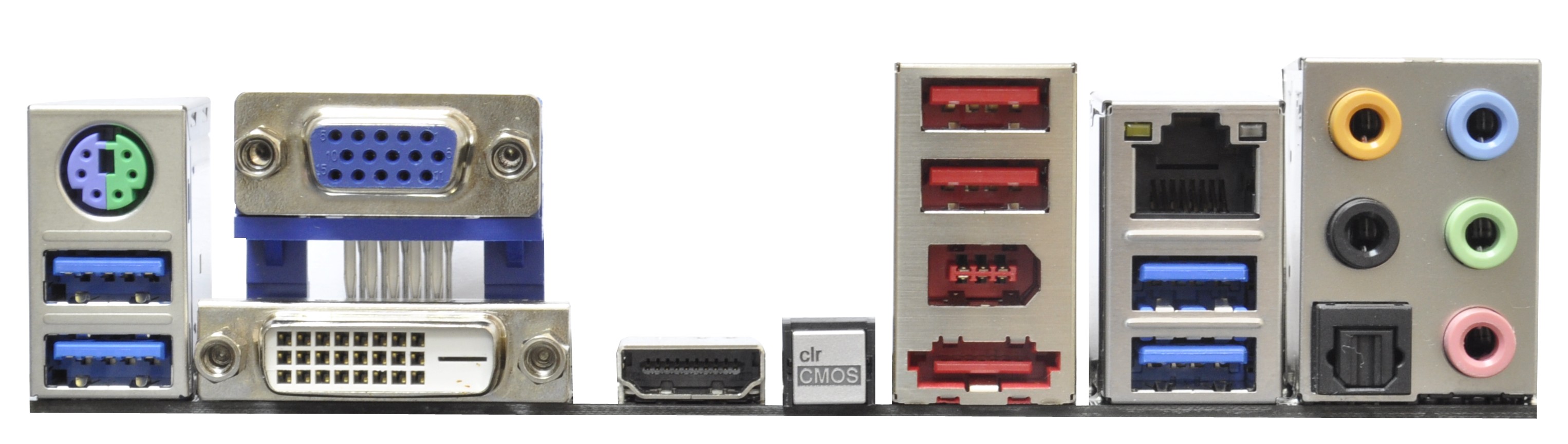
The I/O panel is actually fairly bare, as ASRock haven't decided to stack anything on top of the HDMI.  With some extra effort, I'm sure a pair of USBs could be stacked on top of it.  Actually, in my initial preview piece, I stated how the USB ports on the far left (physically at the top of the board) were quite tough to get anything in beyond a USB mouse or keyboard if the DVI video out was used.  ASRock's response was to 'use a USB port extender - we had to cater for those using DVI + HDMI at the same time', which in my eyes is a stone's throw away from 'oops, we didn't spot that'.  Other connectivity comes in the form of a PS/2 port, two native USB 3.0 ports, two USB 3.0 ports from an ASMedia ASM1042 controller, a VGA port, two USB 2.0 ports, an eSATA 3 Gbps port, Realtek controller enabled gigabit Ethernet, a Firewire port, an optical SPDIF out, and the standard audio outputs.


Friday, June 3, 2011

Introducing the Dell Precision T1600: Workstation Class

We've spent a lot of time dissecting boutique gaming desktops, but there are entire other classes of hardware that we only rarely put through their paces. Today that changes with the first in what we hope will be many reviews of workstation-class desktop machines, and we're kicking things off with a mid-range workstation courtesy of Dell: the new Precision T1600. Designed for low power and high performance and equipped with an entry-level workstation graphics card from NVIDIA, we'll run it through our usual desktop gauntlet along with a couple of extra tests and see what Dell brings to the table.


Dell's Precision T1600 is pretty unassuming, but workstation desktops are exactly that: they're work horses, not show ponies. But inside this Micro-ATX mid tower is a decent amount of enterprise-grade hardware. Dell has made big strides with their new Precision T1600 series. There's the usual generational hardware refresh: the T1600 sports Sandy Bridge-based Intel Xeon processors along with a GF106-based NVIDIA Quadro graphics card. But Dell (not at all unlike HP) has also added a smattering of ISV certifications to this tower, including Autodesk's AutoCAD, Maya, and 3Ds Max. Strangely there's no certification from Adobe, whose production suite would likely benefit substantially from a system like this one. In fact, the NVIDIA Quadro 2000 card in our review unit is one of the frustratingly few cards actually certified for Premiere Pro CS5's Mercury Playback Engine (although anyone with an NVIDIA graphics card, 1GB of video memory, and access to Google can get MPE to work).


Dell Precision T1600 Specifications
Chassis Dell Custom
Processor Intel Xeon E3-1270
(4x3.4GHz + HTT, 32nm, 8MB L3, 80W)
Motherboard Dell Proprietary Motherboard with C206 chipset
Memory 2x2GB Hynix DDR3-1333 ECC @ 1333MHz (expandable to 16GB)
Graphics NVIDIA Quadro 2000 1GB GDDR5
(192 CUDA Cores, 625/1250/2608MHz core/shaders/RAM, 128-bit memory bus)
Hard Drive(s) 2x Seagate Barracuda 500GB 7200-RPM SATA 6Gbps in RAID 0
Optical Drive(s) Optiarc DVD+/-RW Combo Drive
Networking Broadcom NetXtreme Gigabit Ethernet
Intel 82579LM Gigabit Ethernet
Audio Realtek ALC269 HD Audio
Speaker, mic/line-in jacks for stereo sound
Front Side 4x USB 2.0
Headphone and mic jacks
Optical drive
Top -
Back Side 2x PS/2
6x USB 2.0
2x Ethernet
3x DisplayPort (one disabled)
Serial
Speaker, mic/line-in
DVI-D
Operating System Windows 7 Professional 64-bit SP1
Dimensions 6.89" x 16.99" x 14.17" (WxDxH)
Weight -
Extras RAID 0
ISV Certification
Warranty 3-year basic hardware service with 3-year limited onsite service
Up to 5-year available
Pricing Starts at $629
Review system configured at $2,255

The review unit Dell shipped us is fairly beefy compared to its base spec, upgrading to the second-fastest processor they have available (the E3-1280 is 100MHz and $600 more) and the absolute best graphics card the tower ships with.

If you haven't ever checked out enterprise-class hardware before, a couple of things here are going to be pretty interesting to you. First is the Sandy Bridge-based Intel Xeon E3-1270. This chip is ostensibly an enterprise version of the desktop Core i7-2600, running at a nominal 3.4GHz and capable of turbo-ing up to 3.8GHz, but in this instance the integrated graphics have been disabled completely: if you take the Quadro out of the tower, there just won't be any video output. The flipside is that losing the GPU knocks the chip's TDP down to just 80 watts. The C206 chipset it's strapped to is also the server/workstation equivalent of the desktop H67.

There's also the NVIDIA Quadro 2000, a single-slot video card based off of NVIDIA's GF106 chip. It sports a full 192 CUDA cores and 1GB of GDDR5 strapped to a 128-bit memory bus, but clocks have been significantly curbed to hit the card's 62-watt TDP. The desktop GeForce GTS 450 (built on the same chip) has a nominal core clock of 783MHz (1566MHz on the shaders), while the Quadro 2000 runs at just 625MHz on the core and 1250MHz on the shaders. The GDDR5's memory speed has taken a massive hit, too, going from 3.6GHz down to just 2.6GHz. That said, there are reasons: the Quadro 2000 can be cooled using a single slot, it runs quietly, and more importantly it's optimized for workstation tasks the GTS 450 isn't designed for.

It's also interesting to see a RAID 0 setup come through here, something that's been a bit rarefied. Some enthusiasts swear by RAID 0 (yours truly, for example) while others don't see the point. While this striped RAID is still running off of mechanical drives, it at least provides a tangible boost over running a single disk. That said, it still can't really replace the performance of an SSD, but at least it can beat the capacity for a lot cheaper.

The rest of the system is going to seem fairly uninspiring, but try to remember: this is Dell's entry-level workstation. It doesn't need the biggest and best, it just needs to provide a sensible balance of price and performance for the intended tasks. I'll go ahead and gripe about the power supply, though: 265 watts isn't an issue for a computer like this, but the stated 65% minimum efficiency is frankly dismal. Even under peak load that wattage isn't liable to be a huge problem, but in a business environment every watt counts and that only becomes more and more important as the number of systems deployed increases. Dell is willing to offer an 85% efficient 320 watt power supply as a $50 upgrade, but frankly that seems miserly, especially when Antec sells a 380 watt, 80 Plus Bronze certified power supply for $45. That may be an off-the-shelf consumer product, but the point stands. Dell should simply eliminate the 265-watt PSU option and use the 320-watt model as the default.

CyberPowerPC Gamer Xtreme FTW: Performance at Any Cost

There seems to be an interesting cottage industry between custom desktop boutiques in trying to build the single fastest machine consumers can buy, and it's not at all dissimilar to the kind of competitive thinking that produces utterly impractical video cards like the AMD Radeon HD 6990 or NVIDIA GeForce GTX 590 that threaten to populate those machines. Somewhere along the line, someone said "screw it" and decided to figure out just how much of a speed demon they could build while still being able to market and sell it to consumers and support it without tarnishing the brand. DigitalStorm has pretty aggressively held on to our "fastest computer we've ever tested" crown for a while, but CyberPowerPC looks to steal it away with their Gamer Xtreme FTW Edition.


And so the arms race continues. I think if you'd told me ten years ago I'd be testing desktops like these for a living I'd've exploded with joy, but it's bittersweet. The CyberPowerPC Gamer Xtreme FTW is an absolute monster, but it's priced accordingly, and when I look at it I actually feel the same way I do when I discover my old Underground Seas (I've played Magic: the Gathering since '94) are worth at least $80 apiece: it's fun to play with, but essentially too hard to get for everyone to enjoy. How hard to get? Check this out:

CyberPowerPC Gamer Xtreme FTW Specifications
Chassis Thermaltake Level 10 GT
Processor Intel Core i7-990X @ 4.5GHz (25x180BClk)
(spec: 6x3.46GHz, 32nm, 12MB L3, 130W)
Motherboard Gigabyte G1.Sniper Motherboard with X58 chipset
Memory 6x2GB Kingston HyperX DDR3-1600 (expandable to 24GB)
Graphics 2x EVGA GeForce GTX 590 3GB GDDR5
(1024 CUDA Cores, 607/1215/853MHz Core/Shaders/RAM, 384-bit memory bus)
Hard Drive(s) 2x Intel 510 120GB SATA 6Gbps SSD in RAID 0
Hitachi Deskstar 7K3000 2TB 7200-RPM SATA 6Gbps HDD
Optical Drive(s) LG WH-10 BD-RE/DVD+-RW Combo Drive
Lite-On DVD+-RW Drive
Networking Bigfoot Networks Killer Gigabit Ethernet
Audio Creative SoundBlaster X-Fi Audio
Speaker, mic, line-in, and surround jacks for 7.1 sound
Optical/digital out
Front Side AeroCool Touch-2000 Fan Controller
5x USB 2.0
Card reader
Headphone and microphone jacks
Top Thermaltake Fan Controller
2x USB 3.0
eSATA
Back Side PS/2 mouse and keyboard ports
Digital out
4x USB 2.0
2x eSATA
2x USB 3.0 (routed to top of the case)
Gigabit Ethernet
Optical out
7.1 surround jacks
Operating System Windows 7 Home Premium 64-bit
Dimensions 23" x 11.1" x 23.2"
Weight 28 lbs (case only)
Extras Cooler Master Silent Pro Gold 1000W PSU 80 Plus Gold Certified
Asetek 570LX 240mm Liquid CPU Cooler
AeroCool Touch-2000 Fan Controller
Card Reader
Warranty 3-year limited warranty with life-time customer care
Pricing Starts at $1,565
As configured $5,017

So yeah, I believe that's the first time we've broken five grand on a custom desktop machine. But when your motherboard, CPU, and case retail for nearly two large all by themselves, that's not too surprising.

For starters, there's the Intel Core i7-990X, arguably the fastest processor Intel ships today. While it doesn't quite have Sandy Bridge's raw clock-for-clock performance, it makes up for that shortcoming by sporting six Hyper-Threaded cores. And because it's built on Intel's 32nm process, it runs remarkably cool. Stock clock speed is 3.46GHz with 12MB of L3 cache, and it's able to turbo up to as much as 3.73GHz on two cores.

CyberPowerPC has overclocked the hell out of it, though, but they opt not to make use of the unlocked multiplier on the CPU: they've instead ratcheted up the BClk from 133MHz to 180MHz and actually reduced the multiplier to 25x. The resulting clock speed is a respectable 4.5GHz, fast enough to put it in competition with Sandy Bridge for single-core speed, and with 50% more cores than the current SNB offerings. Strapped to the i7-990X's three memory channels are six 2GB DIMMs of Kingston HyperX DDR3-1600 for a total of 12GB, running at DDR3-1440 due to the change in BClk.

Supporting this demon of a CPU and its copious memory capacity is Gigabyte's G1.Sniper motherboard. Gigabyte recently released their G1 line of motherboards and they're pretty beastly; the Sniper model brings integrated Bigfoot Networks Killer 2100 Gigabit Ethernet along with Creative SoundBlaster X-Fi. There's the usual Marvell SATA 6Gbps controller as well, along with USB 3.0 support. The G1.Sniper is a very fully-featured piece of hardware, but you'd pay dearly for the privilege: the motherboard's retail price of $429 is onerous considering you can buy a Core i7-2600K and a P67-based motherboard to house it in for the same outlay.

CyberPowerPC didn't skimp on the storage subsystem either: while the 2TB Hitachi storage drive is an amusing divergence from the usual 1TB Western Digital Caviar Black, the pair of 120GB Intel 510 SSDs configured in RAID 0 produces a remarkably fast system drive that sports enough capacity for a healthy selection of games.

Of course, the big ticket items are the pair of NVIDIA GeForce GTX 590s configured in Quad-SLI. Each of these cards has two GF110 chips on it, complete with a 384-bit memory bus with access to 1.5GB of GDDR5 per chip. The GPUs themselves sport the full 512 CUDA cores, but they've had their clocks reduced to fit into the GTX 590's 300W thermal envelope. I'll admit I've been a bit snarky with this review unit: whenever I've had people come over, I've opened the side of the case, shown them to the two GTX 590s, and announced "get a good look; almost nobody else will ever see one of these, let alone a pair."
Finally, they house all of this incredibly powerful hardware in Thermaltake's new Level 10 GT enclosure. I hesitate to spend too much time talking about this case because I actually have one in house that I'll be reviewing soon. Oh, and the processor is liquid cooled with a 240mm radiator and four 120mm fans. And there's a kilowatt 80 Plus Gold certified power supply from a reliable vendor. And a fan controller in the front by NZXT. I think that covers everything. Suffice it to say, this is an awful lot of hardware.

Related Posts Plugin for WordPress, Blogger...
Powered by Blogger.